Kitchenware Icons for Creative Projects
Essential Design Tools for Modern Creatives
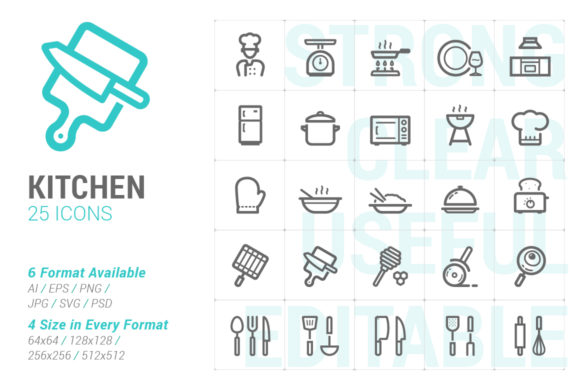
Designers, marketers, and creators often need visual elements that are both functional and adaptable. The Kitchenware and Utensil Strong Line Icon collection delivers exactly that. With a clean, bold aesthetic and multiple file formats, these icons are ideal for a wide range of digital and print applications. Whether you're building a website, crafting a presentation, or designing promotional material, this icon set provides a versatile foundation that enhances clarity and visual appeal.
What Makes the Icon Set Stand Out
The Kitchenware and Utensil Strong Line Icon set is designed with precision and usability in mind. Each icon is crafted in a strong line style that balances simplicity with visual impact. The set includes:
- Illustrator (.ai) files with organized artboards
- Eps8 vector files for compatibility with older software
- Individual SVG files in four sizes (64x64, 128x128, 256x256, 512x512)
- PNG and JPG files in the same sizes, ideal for quick use in any platform
- Photoshop shape layers for seamless integration into layered designs
Because the icons are available in multiple formats and sizes, they adapt easily to different workflows and output requirements.
Creative Possibilities Across Platforms
One of the most compelling aspects of the Kitchenware and Utensil Strong Line Icon set is its flexibility. Here are a few ways different professionals can use it:
- Web Designers: Use the SVG format to scale icons without losing quality across responsive layouts. The strong line style ensures icons remain legible even on mobile screens.
- Marketers: Incorporate icons into landing pages, email campaigns, or social media assets to highlight services or features related to food, cooking, or home goods.
- Educators: Build visually engaging lesson plans or infographics using PNG or JPG files for easy drag-and-drop placement in slide decks or handouts.
- Entrepreneurs: Use icons in pitch decks or branding materials to add a professional, cohesive visual language that aligns with your product or service offerings.
- Bloggers and Content Creators: Enhance recipe posts, how-to guides, or lifestyle content with icons that make information easier to digest and more visually appealing.
Customizing for Consistency and Clarity
While the icons come in a bold, defined style, they can be customized to fit your brand or project. Because they are available as vector files (.ai, .eps, .svg), you can easily adjust stroke width, color, or even combine icons into compound graphics.
For example, a food blogger might recolor the icons to match their site’s color scheme. A mobile app developer could layer icons with other interface elements to create intuitive navigation. Designers working on print materials might scale the 512x512 versions to maintain sharpness on high-resolution outputs.
When customizing, it’s important to maintain consistency. Stick to a limited number of variations per project to avoid visual clutter. Also, ensure that icons are used purposefully—either to explain, guide, or enhance—not simply as decoration.
Applications Beyond the Obvious
While the name suggests a focus on kitchen tools, the utility of the Kitchenware and Utensil Strong Line Icon set extends beyond cooking-related content. Consider these creative reinterpretations:
- Infographics: Use icons to represent categories like "tools," "process," or "ingredients" even in non-food contexts like project planning or workflow diagrams.
- Mobile and Web Apps: Apply icons to represent settings, tools, or actions—especially in lifestyle or productivity apps that include meal planning, grocery lists, or organization features.
- Print-on-Demand Products: Integrate icons into t-shirt designs, mugs, or notebooks aimed at foodies, chefs, or home cooks.
- Instructional Material: Combine icons with short text labels to create step-by-step guides, visual manuals, or illustrated tutorials.
- UI Kits: Add these icons to your design system for quick access to recognizable, scalable visuals that support user interaction.
Organizing and Managing Icon Assets
To make the most of the Kitchenware and Utensil Strong Line Icon set, it’s helpful to organize files effectively. Consider creating a folder structure by format and size, especially if you're working in a team or across multiple projects. Naming conventions like kitchenware_knife_128x128.png or utensil_spoon_512x512.svg help ensure clarity and fast retrieval.
For digital teams, storing icons in a shared asset library or design system makes them accessible and reusable. Designers can also create symbol libraries in tools like Sketch or Figma to streamline usage across design files.
Practical Tips for Getting the Most Out of the Set
Here are a few actionable suggestions for maximizing the value of the Kitchenware and Utensil Strong Line Icon collection:
- Start with a purpose: Know why you’re using an icon before placing it. Does it guide the user? Clarify a step? Add visual rhythm?
- Test for legibility: Especially with smaller sizes like 64x64, test icons on different screens and backgrounds to ensure they remain effective.
- Combine with typography: Pair icons with clear labels or headings to ensure accessibility and comprehension, especially for users with varying visual abilities.
- Use size strategically: Larger icons (256x256 or 512x512) work well for featured graphics, while smaller sizes are ideal for interface elements or thumbnails.
- Experiment with layout: Try using icons in grids, timelines, or comparison charts to enhance visual storytelling.
Final Thoughts: A Versatile Tool for Everyday Design
The Kitchenware and Utensil Strong Line Icon set is more than just a collection of images—it’s a design resource that empowers creators to communicate clearly, efficiently, and with visual flair. Whether you're building a brand, launching a product, or simply organizing content, these icons offer a smart, scalable solution that adapts to your needs.
By combining thoughtful customization with practical application, you can turn these icons into powerful visual tools that elevate your work. Explore the full range of formats, experiment with layouts, and let these icons help you tell your story with clarity and style.